
Setup and Calibration Guide
Everything you need to know to set up LirayBot's advanced pixel architecture developed by the Liray team on your PC and perfect your farming.
1. First Setup
Since LirayBot does not inject any DLLs, it does not involve complex installation steps.
- Log in to the LirayBot panel and download
LirayBot.zipfrom the Download tab. - Extract the folder from the zip.
- Right-click the application and select Run as Administrator.
- In the panel, paste your license code into the License Key box.
To send mouse and keyboard hardware simulations to Metin2 windows, Windows Administrator permission (UAC) is mandatory. Otherwise, the bot cannot transmit clicks.
2. Adding Server and Window Selection
- Add Server: Go to Setup > Add Server and type the name of your server.
- Windows (Refresh List): With your game window open, press the refresh button. Select the Metin2 game window from the list.
3. Target HP Bar Calibration
- Click once on any metin in the game to make the HP bar appear at the top.
- Click the Select HP Bar button on the bot.
- Draw a small rectangle that only includes the red health fill area of the HP bar.
Do not include the black frame or text outside the HP bar. Taking a small cross-section of only the pure red color prevents mistakes.
4. Metin Calibration
- Metin Name Template: Click Select Metin Name and draw a tight box around the word "Metin" on the game screen.
- Y-Offset (isim_click_dy): If it clicks on empty space, adjust this value between 35 and 55 in Settings.
5. Minimap and Route Setup
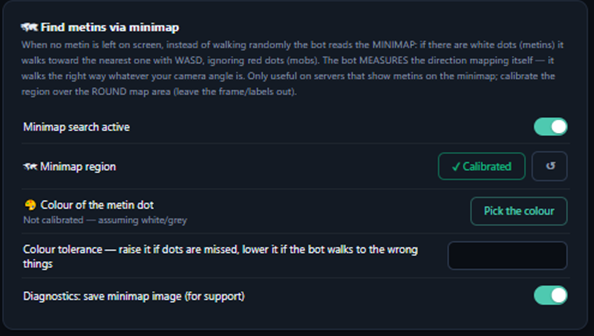
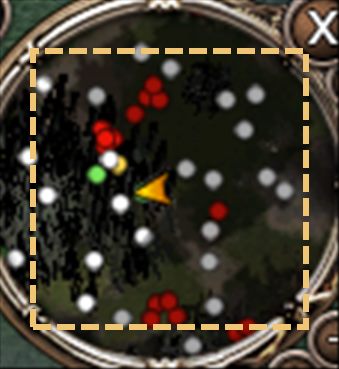
- Minimap Region: Enclose the round map leaving the frames outside.
- Dot Color: Metin dots might be red or yellow. Introduce the color from the Select Color menu.
6. Advanced Add-ons
You can multiply LirayBot's capabilities with add-ons. They automatically come into effect.
🤖 CAPTCHA and PM Solver
Solves complex verifications like Uriel and Svside using custom systems developed by the Liray team. Responds to PMs like a human. Usage: Automatic.
🛡️ HWID Spoofer
Hides your hardware ID. Usage: Activate it under Spoofer in the Setup tab.
🌐 Proxy
Nullifies IP ban risk. Usage: Enter your details in Settings > Proxy.
7. Farm Modes and Starting
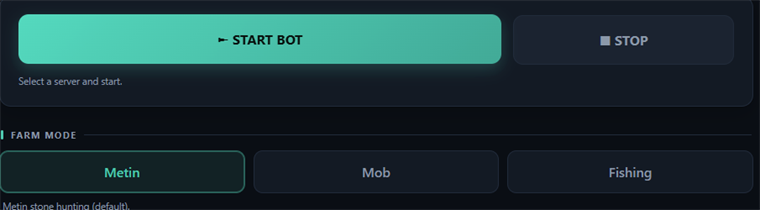
Once you see "Ready to Farm", press START. To stop the bot, press F12.

8. Troubleshooting
| Issue / Symptom | Solution |
|---|---|
| Bot opens but no clicks | Close bot. Must Run as Administrator. |
| Window not found error | Window ID changes when game closes. Refresh windows and reselect. |
| Clicks empty space below stone | Adjust Y Axis Offset between 35-55 in Settings. |
Issue not solved? Contact our technical team.
Get Support on Discord